

A golf swing analyzer records your motion through each swing and shows it back as numbers. The wrist units compared here are sensors you buy and strap on. Striped is a new approach that reads your hands, hips and head with your iPhone, AirPods and Apple Watch, and speaks the numbers you pick after each swing.
What a golf swing analyzer measures
A wearable analyzer reads motion from sensors on your body. Golf swing analysis turns that motion into numbers after each swing, such as tempo, plane and hand path.
Golf swing video analysis needs a camera pointed at you instead. The three setups below pair swing analysis software with sensors you wear or carry.
A 2024 study in Scientific Reports followed the wrist of 20 golfers through the swing with one wrist-worn inertial sensor. Its authors relate the method to smartwatches.
A number after each swing shows what changed, and seeing it while you practice can help you repeat the swings that work.
How they stack up
| What | HackMotion | deWiz | Striped |
|---|---|---|---|
| What you buy | $345 (Core) | $599 (US store) | No extra device to buy |
| What you wear | One wrist sensor on a hand strap | One wrist-worn unit on a strap | iPhone in your front pocket, AirPods, Apple Watch on your lead wrist |
| What it reads | Lead-wrist flexion and extension (Core) | Tempo, backswing length and plane, hand speed, transition, 3D hand path | Tempo at the hands, swing plane, hand path, wrist speed, hip turn, head movement |
| App | HackMotion Golf app (iOS, Android) | deWiz Golf app (iOS, Android) | Striped on iPhone and Apple Watch |
| Camera | Not listed as needed | Not listed as needed | No camera |
| Feedback | Sound, haptic and visual feedback | Instant feedback after each swing, with audio | Any metric spoken in AirPods right after each swing, a wrist tap on Apple Watch, and a visual report with detailed metrics |
| Hip motion | Not listed on its product pages | Not listed on its product pages | Hip turn and sway, from iPhone |
| Head motion | Not listed on its product pages | Not listed on its product pages | Head movement and head turn, from AirPods |
What HackMotion measures
HackMotion is one sensor worn on the wrist with a hand strap, and it fits under a glove. HackMotion records lead-wrist movement and shows flexion and extension data for the lead wrist.
- HackMotion Core lists at $345 as a one-time payment in the US store.
- HackMotion Plus lists at $490 as a one-time payment in the US store. HackMotion Plus identifies 8 putting faults and 13 full-swing faults.
HackMotion says there is no weekly, monthly or annual fee, and the sensor comes with a lifetime license.
HackMotion gives sound, haptic and visual feedback. The HackMotion Golf app is available for iPhone, iPad and Android.
What deWiz measures
deWiz is one wrist-worn unit on an adjustable strap. For each swing, deWiz presents 14 measurements, including transition, backswing plane, tempo and hand speed, with a 3D model of the hand path.
deWiz’s steepening and shallowing measure reads the rotation of the lead forearm through transition. After every swing, deWiz gives instant feedback, with audio.
deWiz’s optional Learning Stimuli gives a light electric impulse when a swing breaks preset parameters. The deWiz Golf app shows each swing, on iOS and Android.
In the US store, the deWiz Golf Swing Analyzer lists at $599. The deWiz product page lists deWiz Plus as optional, free for a month and then $5 a month.
What Striped reads with the devices you own
Striped uses three devices together, each measuring the part of the swing it’s closest to. Your iPhone in your front pocket reads your hips. AirPods read your head, and Apple Watch on your lead wrist reads your hands.
Apple’s WWDC23 session on Core Motion names golf as a short, impact-based use case for Apple Watch motion data.
In the session report, the hand path card shows the path, plane and speed of the hand that wears your Apple Watch.
There is no clip-on sensor and no camera on a tripod.
After each swing, you hear a soft chime, then the numbers you choose read out in your AirPods. They can be tempo, hand speed, club speed, swing plane, hip turn, head movement and more. Apple Watch can tap your wrist when a swing counts.
Every swing also gets a visual report with detailed metrics.
Striped times your hands. Apple Watch finds the top where your hands reverse.
In one 7-iron session, the three swings read 2.8, 2.9 and 3.0, near the 3:1 pace of the app’s full-swing metronome (example swings from one session). A steady ratio from swing to swing can help your contact.
| Swing | Backswing | Downswing | Ratio |
|---|---|---|---|
| Swing 1 | 0.84 s | 0.3 s | 2.8 |
| Swing 2 | 0.86 s | 0.29 s | 2.9 |
| Swing 3 | 0.86 s | 0.29 s | 3.0 |
| Session | 0.85 s | 0.29 s | 2.9 |
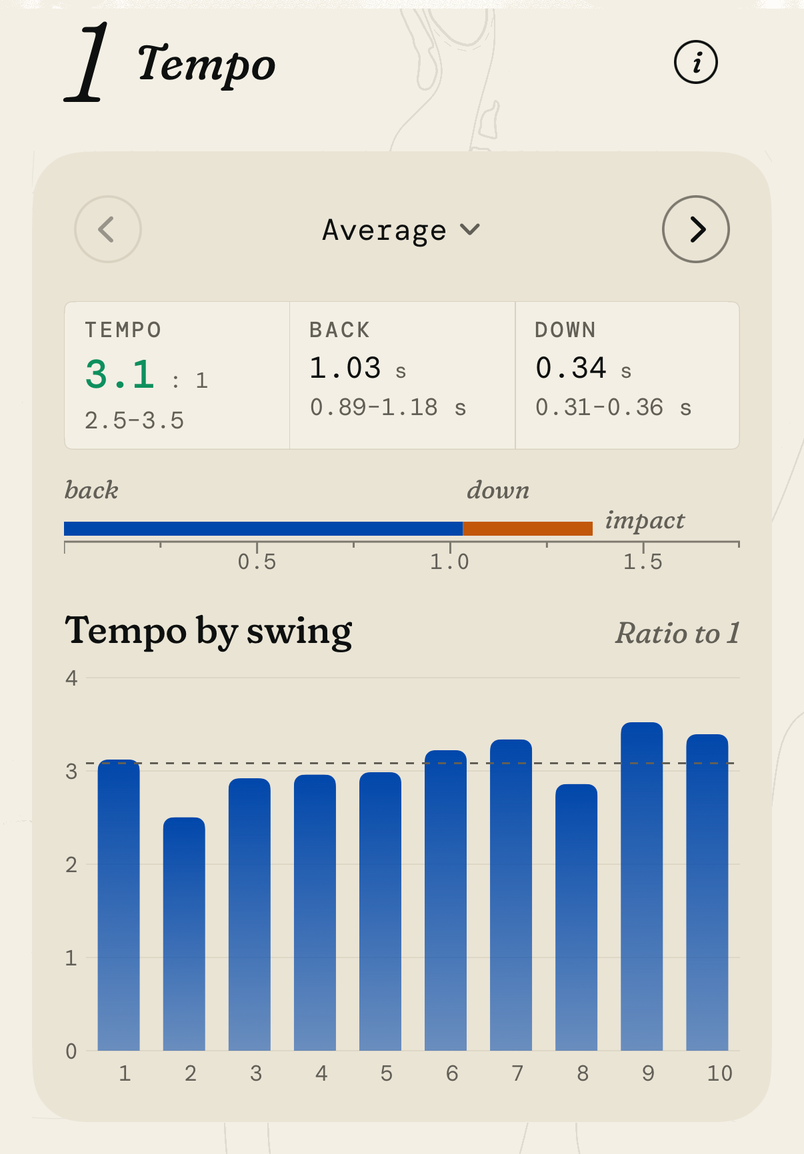
The golf tempo guide explains the ratio, and the golf swing path guide covers the hand path.
Who reads your hips and head
Your hips and head move in every full swing. Seeing them next to your hands can help you spot what changed on a swing that felt off.
HackMotion’s product pages describe wrist measurements and do not list hip or pelvis motion. HackMotion’s product pages do not list head motion.
deWiz’s product pages describe hand, forearm and swing measurements and do not list hip or pelvis motion. deWiz’s product pages do not list head motion.
In Striped, Hip turn shows how far your hips turn and slide from address. Your iPhone, in your front pocket, measures it.
Head movement shows how your head moves from where it was at address. Head turn shows how far it has turned at the top of the backswing. Your AirPods measure both.
In the session report, the head card lists how far your head moved side to side and up and down, and how far it turned at the top.
Apple’s Core Motion documentation for headphones describes a class that “delivers headphone motion updates to your app.”
How to choose a golf swing analyzer for your practice
- Start with what you own. Striped runs on your iPhone, AirPods and Apple Watch, with no extra device to buy.
- Pick what you want to read. The table above shows which setup lists wrist, hand, hip and head motion.
- Pick your feedback. A screen, a sound or a voice in your ears after each swing.
- Keep audio for practice. The R&A’s Rule 4.3 does not allow audio that helps with swing tempo during a round. Striped’s spoken numbers and metronome are for the range and the practice green.
To try Striped:
Put your iPhone in your front pocket, your AirPods in, and Apple Watch on your lead wrist. Profile Devices shows whether your Apple Watch is ready.
On Practice, pick Driver or Irons, then tap Start session.
Lock the screen and hit balls. After each swing, your AirPods read out your tempo.
Open the session report. It shows your tempo, then how your hips, head, hands and wrists moved.
In Progress, compare days with the same club.
Setup help is on the support page, and the home page shows what else Striped measures.
Sources
- Enhancing accuracy and convenience of golf swing tracking with a wrist-worn single inertial sensor (Kim and Park, Scientific Reports, 2024)
- What's new in Core Motion (Apple WWDC23)
- CMHeadphoneMotionManager (Apple Developer Documentation)
- Rule 4: The Player's Equipment, Rules of Golf (R&A)
- HackMotion Core (HackMotion product page)
- HackMotion Plus (HackMotion product page)
- deWiz Golf Swing Analyzer (deWiz product page)
- deWiz data overview (deWiz)
- Practice and Learn modes (deWiz learning center)
- Striped: Striped times tempo at the hands. The top is where the hands reverse, read by Apple Watch on the lead wrist.
- Striped: One 7-iron session (3 swings), tempo at the hands. (example swings from one session)
Cite or embed
Cite this guide: Nick. “How HackMotion and deWiz compare with Striped as golf swing analyzers.” Striped, 2 Nov 2026. https://stripedgolfapp.com/guides/golf-swing-analyzer/
