

PGA news covers tour results, the schedule and the players; for today’s scores, use the PGA Tour’s own site or the broadcast. Two kinds of golf news reach your game, the rule on what you may use in a round and the motion sensors in devices you own. Striped uses your iPhone, AirPods and Apple Watch to measure your swing at practice.
Where to find PGA news today
Most tour coverage is about who leads, who made the cut and who won. The PGA leaderboards guide explains what a board shows, and what it leaves out.
A leaderboard ranks PGA Tour golfers by score. The parts of the story behind it that carry over to your own game are the rules on what a player may use and the timing inside each swing.
The rule that keeps tempo audio off the course
Rules news is the golf news that reaches every round you play. The R&A’s Rule 4.3 “applies to all types of equipment that a player might use during a round.”
Under Rule 4.3a(4), “listening to music or other audio to eliminate distractions or to help with swing tempo” is not allowed. Rule 4.3a(6) also bans training or swing aids that help with “swing plane, grip, alignment, ball position or posture.”
The rule covers the round only. SCGA’s guide to audio equipment and the rules says “there are no restrictions before or after rounds or when play is suspended.”
So a metronome, tones and spoken tempo are for practice only, never during a round. Knowing where that line sits can help you use them freely at the range.
What the devices you own can read
The other news that reaches your game sits in devices you already carry. Apple’s WWDC23 session on what’s new in Core Motion names golf as a short, impact-based use case.
That session describes 800 Hz accelerometer and 200 Hz device motion data on Apple Watch during a workout. It also says AirPods head tracking uses the same device-motion algorithms as iPhone and Apple Watch.
Reading the swing at the wrist is a studied method. A 2024 study of a single wrist-worn motion sensor tracked the wrist through the golf swing on 20 golfers. Its authors relate the method to smartwatches.
How Striped reads your swing
Striped is a new way to measure your swing with your iPhone, AirPods and Apple Watch. There is no extra camera or device to buy.
Each device reads the part of the swing it sits closest to.
- iPhone, in your front pocket, reads your hips.
- AirPods read your head.
- Apple Watch, on your lead wrist, reads your hands and wrist.
While you record, Striped runs a golf workout session so Apple Watch can capture wrist motion in full detail. Striped times your hands. Apple Watch finds the top where your hands reverse.
The tempo behind the Tour pace
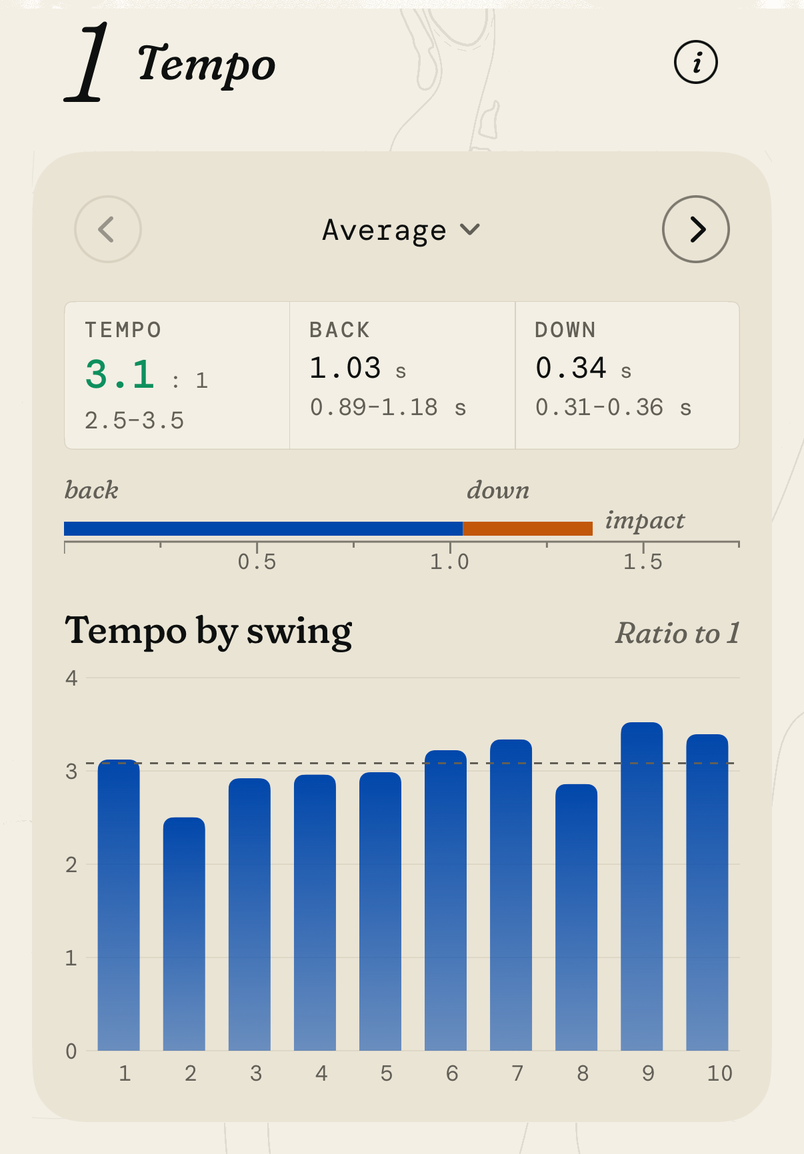
Tempo is your backswing time divided by your downswing time. At 3:1, the backswing takes three times as long. A steady ratio from swing to swing can help your contact.
Striped’s metronome names its 3:1 full-swing pace Tour, and it plays 800 ms back and 267 ms down. Hear it in the free web metronome, or in AirPods during a Striped session.
Over 11 irons practice sessions in Striped, the session average ran from 2.25 to 3.05, with a median of 2.85 (example data from 11 practice sessions). Six of those sessions landed in the app’s target band of 2.8 to 3.2.
Read the pattern across many sessions. A ratio that stays close to one value shows a rhythm you can repeat.
How to check your tempo in Striped
Put your iPhone in your front pocket and your AirPods in. Wear Apple Watch on your lead wrist, “snug but comfortable” and above the wrist bone, as Apple’s guide to wearing Apple Watch advises.
Open Profile Devices. It shows whether your Apple Watch is ready.
On Practice, pick Irons and a metronome pace if you want one. Hit balls with one club.
After each swing, you hear a soft chime, then your ratio read out in your AirPods.
Stop from iPhone or Apple Watch, then open the session report. The Tempo card shows Tempo, Back and Down.
In Progress, each point is one club’s average for a practice day.
Reading PGA tournament news as a golfer
When a tour story covers a player’s swing change, use it as a prompt to practice. Pick one part of your own swing and give it one bucket.
Tempo is a good first pick, since it asks for no new positions. The golf tempo guide explains the ratio in more depth. The Apple Watch golf guide covers what the wrist reads.
Setup help is on the support page, and the home page shows what else Striped measures.
Sources
- Rule 4: The Player's Equipment, Rules of Golf (R&A)
- Now Hear This: Audio Equipment and the Rules (SCGA FORE Magazine, 2023)
- What's new in Core Motion (Apple WWDC23)
- Enhancing accuracy and convenience of golf swing tracking with a wrist-worn single inertial sensor (Kim and Park, Scientific Reports, 2024)
- Wearing your Apple Watch (Apple Support)
- Striped: Striped times tempo at the hands. The top is where the hands reverse, read by Apple Watch on the lead wrist.
- Striped: The paces the Striped metronome plays (backswing and downswing, in milliseconds).
- Striped: Tempo ratio (backswing / downswing, timed at the hands by Apple Watch), mean per irons practice session. (example data from 11 practice sessions)
Cite or embed
Cite this guide: Nick. “The PGA news that reaches your own game.” Striped, 7 Nov 2026. https://stripedgolfapp.com/guides/pga-news/
Embed a diagram
The diagrams are free to use with credit. Copy the code for one:
Average tempo ratio of each irons practice session, timed at the hands
<a href="https://stripedgolfapp.com/guides/pga-news/#figure-irons-session-tempo-bars"><img src="https://stripedgolfapp.com/guides/pga-news/irons-session-tempo-bars.svg" width="420" height="376" alt="Eleven bars, one for each irons practice session, rise and fall around a dashed 3:1 line, and most of them stop below it. A final bar marks the median session, a little under the line."></a><br>Diagram: <a href="https://stripedgolfapp.com/guides/pga-news/">The PGA news that reaches your own game</a>, Striped